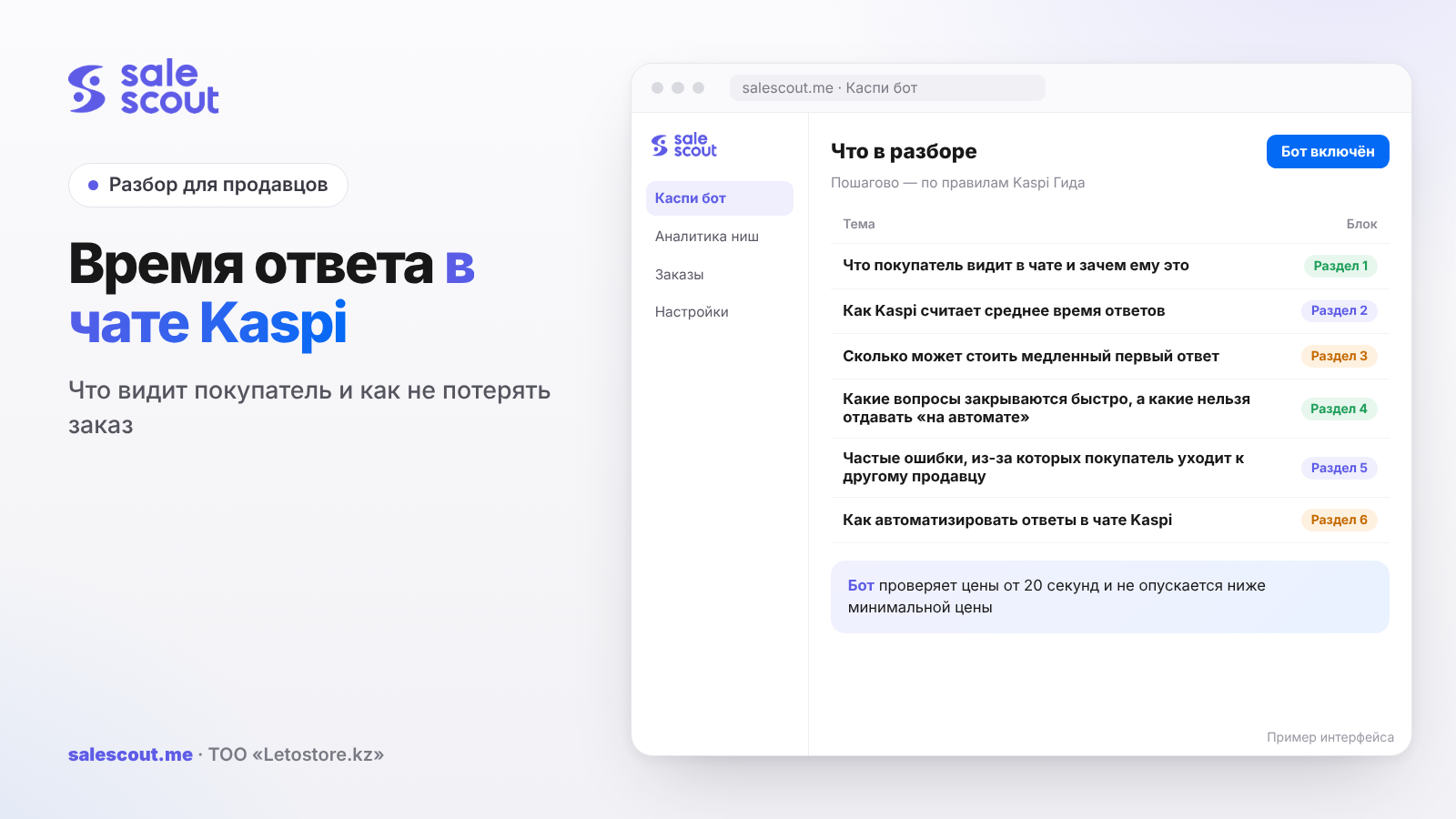
In the chat with a seller in the Kaspi.kz Store, the buyer is shown average response time — how quickly the store usually replies during business hours. Kaspi says this outright: it is there to help the person decide on a purchase, and the lower the average time, the higher the chance the order will be placed with you. It does not affect the rating or the overall quality score, and the store will not be disconnected for a slow reply. If the prices are almost the same, the buyer may choose the seller who answers faster.
In short
- The buyer sees average response time in the chat, including when they write before placing an order — from the product card.
- Only the first reply to a message or a call during your business hours over the last 30 days is counted, after the third contact. The formula: the total time of those first replies is divided by the number of chats.
- If the response rate is below 70%, a note that the seller rarely replies appears in the chat instead of the time. Close that threshold first, otherwise the speed is no longer shown.
- One reply after two hours can leave the response rate within the norm and still raise the average that every later buyer sees.
- Most typical questions such as "where is my order" can be closed from the status in the system. A difficult question is better not invented on the spot — take it on yourself right away.
What the buyer sees in the chat and why it matters to them
The buyer contacts the seller in two ways, both described in the Kaspi Guide for clients. While they are still choosing a product, they can tap the seller they need in the list on the product card and write or call. After the purchase the path is different: «Мои заказы» ("My orders") → the order they need → «Детали заказа» ("Order details"). In both cases the guide says the same: the chat will show how quickly the seller replies during business hours.
The wording Kaspi gives partners is even sharper. Average time is shown in the chat "to help them decide on a purchase." The lower it is, the higher the chance the customer will contact you and order from you. This is not our interpretation and not a promise of sales growth: that is what the guide says, with no figure for how much higher the probability is.
How exactly the label looks on the screen — where it sits and what the text says — is not described in public, so we will not invent the interface. The fact is enough: the person sees reply speed in the chat, and Kaspi places it next to the decision of whom to order from.
There is an important exception. If the response rate is below 70%, the chat will say that the seller rarely replies, instead of showing average time. The buyer is no longer comparing minutes — they see that writing to this store is probably pointless. How the rate is calculated and how many chats you can miss, we covered in “Chat with buyers on Kaspi”. While that label is up, first bring the rate back to 70% or higher: otherwise speed is still not shown in the chat.
Response metrics are rolled out in the Store gradually, together with the Kaspi Pay app update. If the block is not in your cabinet yet, that is not necessarily an error: the queue may not have reached the store. Look in Kaspi Pay: Магазин на Kaspi.kz → «Показатели качества» ("Quality metrics") → «Среднее время ответов» ("Average response time").
How Kaspi calculates average response time
Average response time = total time to reply to customers' first message or call ÷ number of chats.
The calculation takes the first reply, not the whole thread. After that you can write every two minutes — it will no longer affect the average. But being late with the first message or the first answered call goes straight into the figure the next buyer will see.
The value appears after the third message or call in the last 30 days. Only contacts during your business hours are counted: a nighttime "where is my parcel?" does not go into the metric. There is one exception, and it is easy to miss. If the buyer wrote less than 15 minutes before the end of the business day, the chat is included in the calculation only if you managed to reply. If you did not — the contact is not counted. But if in the settings the warehouse "works" until 21:00, and you put the phone away at 18:00, every question from 18:00 to 20:45 is counted as an ordinary business-hours contact.
The response rate is calculated separately: the number of replies to customers within 3 hours is divided by all chats and multiplied by 100%. A reply counts if the contact arrived during business hours and you got in touch with the person no later than three hours later. You replied after three hours and ten minutes — for the rate that is a chat without a reply, even if the thread happened later. For average time such a reply is heavy as well: a long interval goes into the numerator.
Average response time does not affect the rating or the overall quality score, and the store will not be disconnected because it grows. The guide says this directly. The cost is different: the buyer sees how quickly you usually reply, and some people go to another seller after the conversation. In the «Среднее время ответов» ("Average response time") section in Kaspi Pay you can see whom the customer eventually bought from — you or a neighbour. Once a week, open that list and look at the chats that ended in someone else's order.
Kaspi recommends three things: reply within 30 minutes during business hours, regularly check new messages and calls, and prepare answers to frequent product questions in advance. Thirty minutes is an official recommendation, not a disconnection threshold and not a requirement for the average. The three-hour window protects only the response rate. The buyer, meanwhile, sees the average, and one reply "on the edge of three hours" already looks to them like a long pause.
How much a slow first reply can cost
Kaspi has no public statistics on "how much orders fall if average time is such-and-such." There is only a qualitative formula: less time means a higher chance of a purchase, and you can see in the cabinet whom the person who wrote to you eventually bought from. So what follows is not a conversion rate and not a promise of growth, but the arithmetic of one lost order. If your cabinet has no such walk-aways, you can skip the example. If it does — estimate the sum at your own prices.
A hypothetical example, not a client case. Assumptions: two stores sit in the same product card; the purchase cost for both is 34,000 ₸; the fee is taken as 12.5% including VAT, as in most categories in the Kaspi tariff snapshot of Oct 15, 2026 (before your own calculation, check the category rate in the guide); delivery is not included in the example, and its terms may differ between sellers.
| IP A | IP B | |
|---|---|---|
| Price in the product card | 49,600 ₸ | 48,400 ₸ |
| Purchase cost | 34,000 ₸ | 34,000 ₸ |
| Fee 12.5% including VAT | 6,200 ₸ | 6,050 ₸ |
| Net from one order | 9,400 ₸ | 8,350 ₸ |
The price difference for the buyer is 1,200 ₸. For IP B that is roughly one eighth of their net from the order. The person opens a chat with one seller, then the other, still before paying, straight from the product card. A has a short average time in the chat, B has a long one, or a note that they rarely reply. If, with a small price difference, the buyer leaves for A, IP B did not "almost close the deal." They lost 8,350 ₸ net from that contact.
Suppose that over 30 days six people who had already written or called walk away like this. This is not a frequency from the guide and not a market estimate, only a multiplier: 6 × 8,350 ₸ = 50,100 ₸. Eight walk-aways — 66,800 ₸. Take your own numbers from the «Среднее время ответов» ("Average response time") section: chats that ended in an order with another seller, multiplied by the net on a comparable item. That is a lower-bound estimate of the walk-aways Kaspi already shows in the cabinet.
Now — how one slip changes what the next buyer sees. A hypothetical example, also not a case: 20 first replies over 30 days during business hours.
| Scenario | What the average was made of | What the buyer sees in the chat |
|---|---|---|
| Internal target: close typical questions in 3 minutes | 20 replies of 3 min each | 3 min |
| The Kaspi recommendation is met in every chat | 20 replies of 25 min each | 25 min |
| Almost everything is fast, one slip | 19 replies of 3 min and one after 2 h 3 min | 9 min |
| Several medium ones and one evening reply | 16 replies of 5 min, three of 25 min and one after 2 h 50 min | 16 min 15 sec |
The third row is the most unpleasant one here. A reply after 2 hours 3 minutes still fits the rate window: three hours have not passed, so the chat will not go into "no reply." The rate can stay high. The average, though, grows from 3 minutes to 9. In the next chat the buyer sees nine, even though the store replied almost immediately nineteen times.
The target "typical questions in 3 minutes, wherever possible in all such chats" is an example of an internal bar, not a Kaspi requirement and not a claimed result of any store. The platform's official advice is 30 minutes. Three minutes only make sense as a guide for questions whose answer is already in the order status or in the product card. Chasing them at the cost of a wrong delivery date is not worth it: a fast but incorrect reply later costs more than a manual check.
Which questions can be closed quickly, and which must not be left "on autopilot"
Part of the correspondence on Kaspi repeats day after day. "Where is my order?", "When will it arrive?", "Is it already out for delivery or still with you?", "Can I pick it up today?". The answer to such questions usually sits in the order status: still being assembled, handed over to delivery, waiting at the pickup point. It is better to check the exact status names in your cabinet, not retell them from memory. If the status is open and the wording is honest, you can give the first reply quickly — and it is the first reply that goes into average time.
Another part of the questions cannot be closed that way. The buyer sent a photo of damage, asks for a different size, wants to change the address after shipment, bargains, writes that the wrong colour was delivered, asks to assemble the order "like in the stories." Guessing is dangerous here. A wrong fast reply ("yes, it will be today" when the status does not promise that) saves a minute and costs a cancellation or a dispute. Such chats should be taken immediately by a person who can make a decision: the owner, the manager or the Store manager who has the right to reply in Kaspi Pay.
If the answer follows unambiguously from the status or from the product card description — you can give it quickly, even from a prepared text. Kaspi itself recommends keeping prepared answers to frequent product questions. If the question is non-standard, it is better to write briefly that you are checking and immediately pass the chat to someone who can handle it. A "I'll look now" pause is still shorter than silence until the evening.
Calls are worth remembering separately. Average time counts both the first message and the first reply to a call. Even if you close the thread quickly, a missed call during business hours weighs on the same figure. Keep at hand not only the chat, but also incoming calls in Kaspi Pay.
When speeding up replies is almost useless. If the "who they bought from" list is empty and the complaints are about defects and wrong items, the problem is not the minutes. If the response rate is below 70%, the buyer does not see your time: close the missed chats first. If the schedule in the cabinet is wider than actual time at the phone, narrow it first. A fast but false reply about the date only leads to a cancellation sooner.
Common mistakes that send the buyer to another seller
Treating average time as "a figure for the cabinet" that the buyer does not see. The guide says the opposite: the metric is shown in the chat, to help with the purchase decision. Writing to the person an hour later and hoping they "will wait, the price is lower after all" is risky when a neighbour has a short time in the chat and the price difference is small.
Saving first replies for the evening. During the day eight short "where is the order?" messages arrived, you opened the app at 20:40 and replied to everyone at once. For the rate, if you stayed within three hours, the day can look fine. For the average those are eight long first intervals. Tomorrow's buyer will already see a new, slower time.
Keeping a schedule in the cabinet until late evening, even though after six nobody looks at the chats. Then contacts from 18:00 until the end of the shift are counted as business-hours ones. An honest schedule that matches when Kaspi Pay is actually in someone's hands often improves both metrics without a single extra reply. How to set working hours, we touched on in the article about order cancellations on Kaspi.
Aiming only at the three-hour window. The response rate does not fall because of that, and it seems that "everything is fine." The buyer, meanwhile, sees the average, which includes one reply after two hours. A healthy rate and a short average are different goals.
Not noticing that "rarely replies" is showing instead of the time. While the rate is below 70%, speed is not shown in the chat. It makes sense to raise the rate first, and only then polish the minutes.
Replying quickly but by guesswork. "It will be today" on an order that has not yet been handed over to delivery sometimes closes the chat for five minutes and opens a conflict for two days. For average time such a reply is useful; for the till, it is not.
Moving the conversation to WhatsApp or Telegram "it's faster there." You may give your number only if the buyer asked for it themselves. Offering to talk about the order outside the Kaspi.kz app is not allowed for the seller: the chat and call history is needed by the platform to review disputes. The detailed correspondence rules are in the already mentioned article about chat with buyers.
Waiting for a penalty for slow replies and doing nothing until a disconnection. There will be no disconnection. Losses come one walk-away buyer at a time, and some of them are visible in the cabinet.
Checklist: what to check in your chats in 30 minutes
In Kaspi Pay open Магазин → «Показатели качества» ("Quality metrics") → «Среднее время ответов» ("Average response time") and «Доля ответов» ("Response rate"). If the blocks are not there yet, check that the app is updated and come back in a few days: the rollout for partners is gradual.
See what the response rate is now. If it is below 70%, the buyer sees that you rarely reply, instead of the time. First work through unanswered chats during business hours, otherwise work on the minutes will not appear in the chat.
In the average time list, open the chats where after the contact the person bought from another seller. Write down what they asked. Often these are two or three repeating questions whose answer was already in the order status or in the product card description.
Check the business hours in the cabinet against when someone actually holds the phone. If the shift in the settings is longer than the real one, shorten it. Contacts in the last 15 minutes of the business day go into the calculation only if you managed to reply: it is worth remembering this when you close the day.
Calculate how one long first reply moves the average. Take the number of chats over 30 days and put your longest first reply into the same logic as in the table above. If the average jumps twofold because of one evening, agree who closes the "tail" until the end of the shift.
Split typical questions from non-standard ones. For "where is the order" and "when is delivery," prepare short honest replies that you can quickly check against the status. For damage, replacements and bargaining, assign at once a person with the right to decide, and do not leave the chat hanging.
Do not forget about calls: they go into the average on a par with messages. If the chat was closed in four minutes but nobody picks up during business hours, the figure in the cabinet will count that.
Check whether you yourself suggest moving to a messenger "for speed." A fast reply should stay in the Kaspi chat: otherwise the conversation speeds up where neither the platform nor the next buyer can see it.
Once a week, compare the list of orders lost after a chat with your net on the item. That shows whether to change the shift and the prepared replies, or whether the bottleneck is already in defects and shipping.
How to automate replies in the Kaspi chat
Typical questions such as "where is my order" and "when will delivery be" can be closed without a manual search in the cabinet. SaleScout built a separate product for this — ИИ-ответчик SaleScout (the SaleScout AI responder). It looks at the order status in the system itself: whether the order is still being placed, whether it has already been handed over to delivery — and replies to the buyer in the chat. If the question is not typical and cannot be answered from the status, the AI responder does not invent a wording. It sends a push to the owner in the SaleScout app: go to the chat, there is a question the program cannot answer.
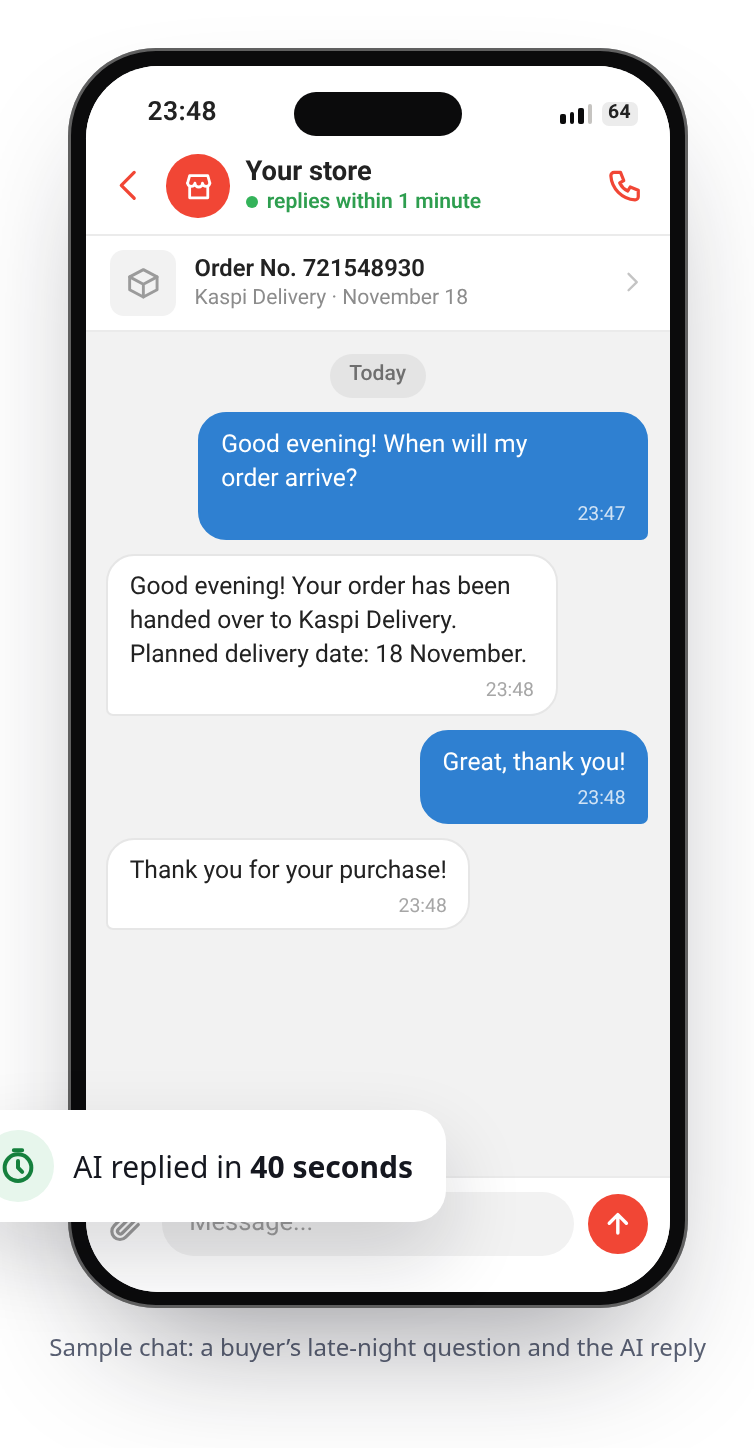
In typical cases the buyer gets a reply quickly, without waiting for someone to open Kaspi Pay between packing boxes. For the store this keeps average response time short on contacts already solved by order status, and avoids missing a difficult chat. An internal target such as "close typical questions in 3 minutes" is appropriate here as a guide, not as a promised result: the outcome depends on the flow of questions and on how quickly the owner picks up non-standard chats. Calls have to be taken separately; they go into the same average time.
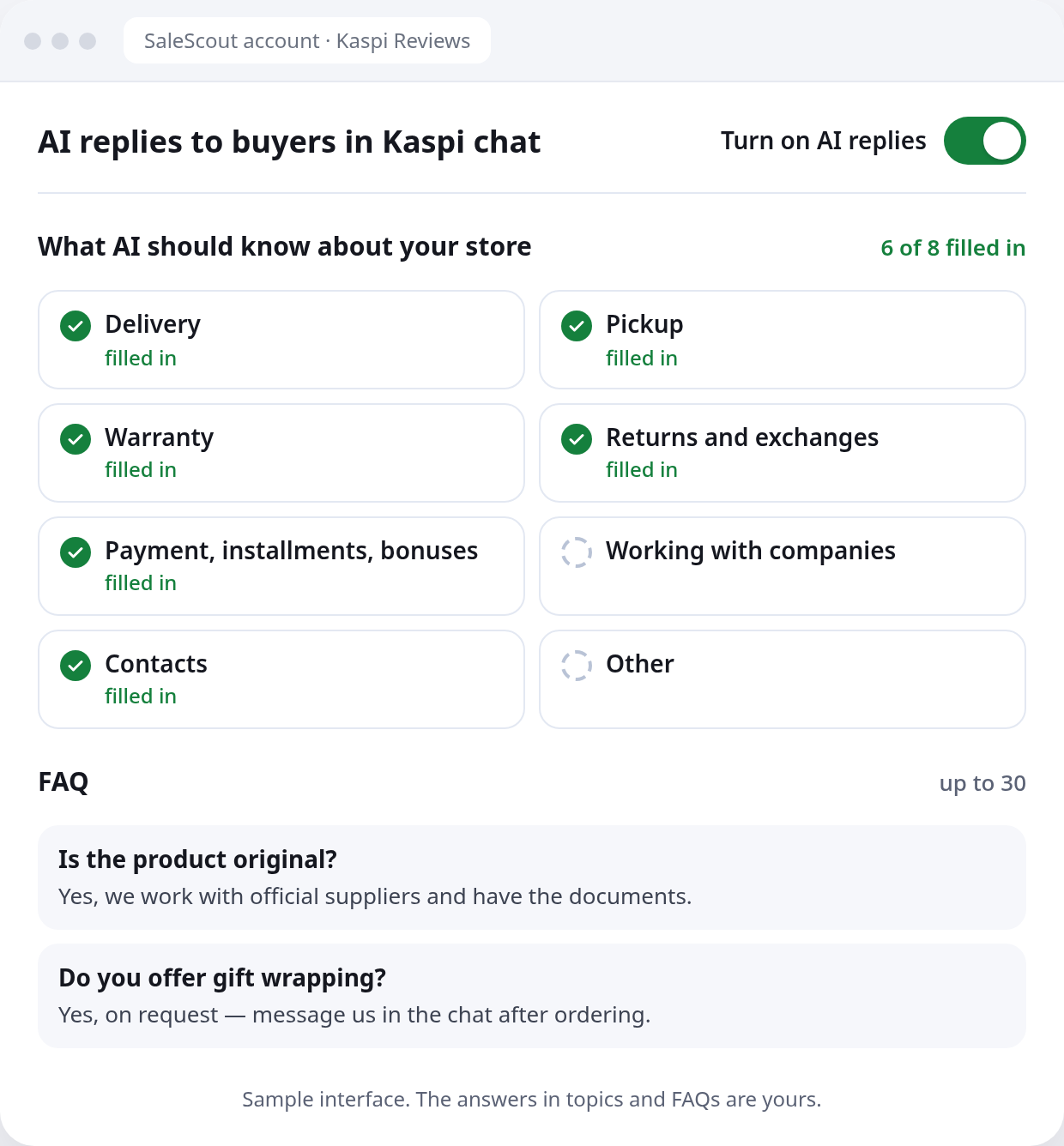
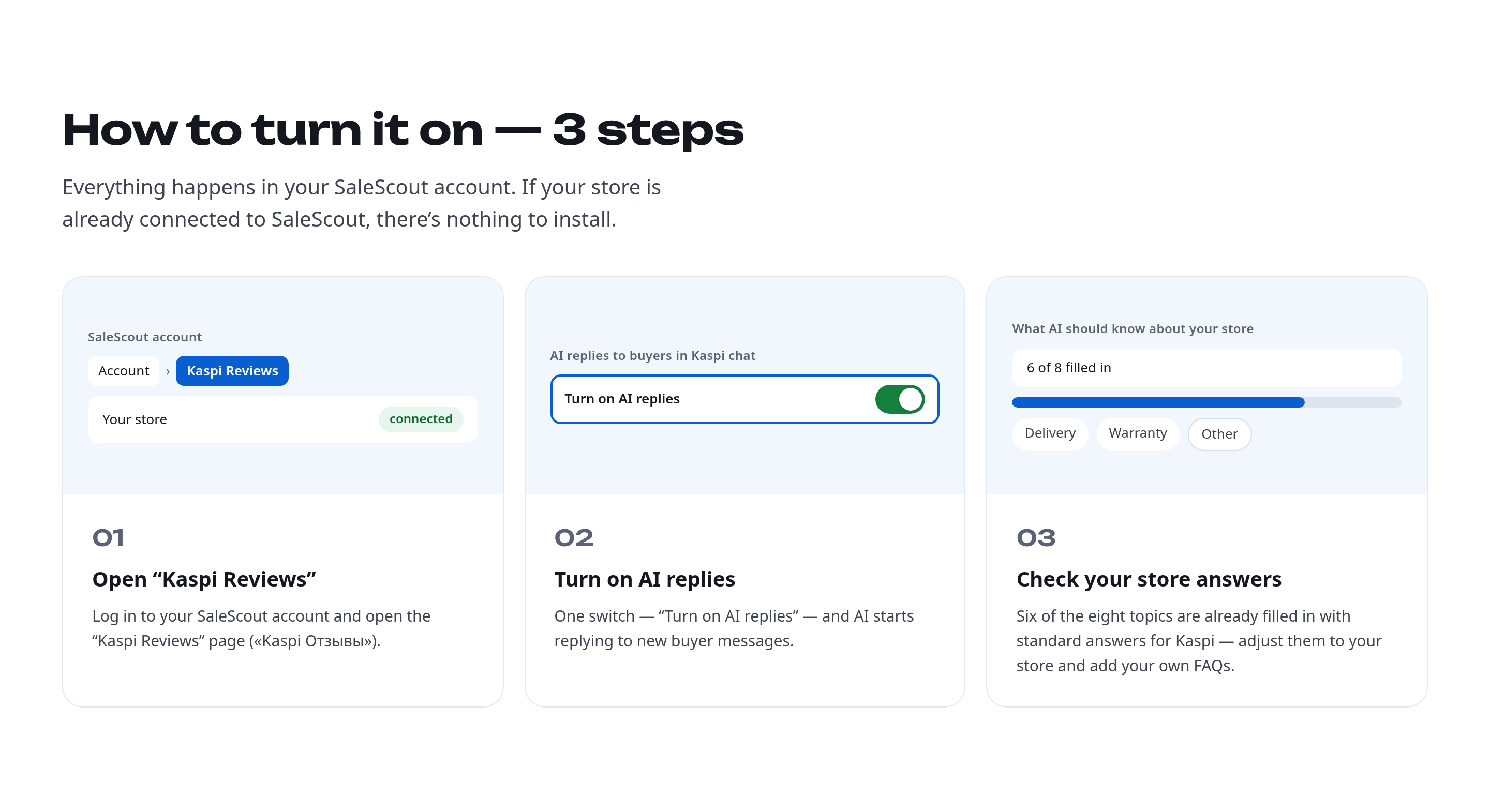
Details about ИИ-ответчик SaleScout are on the Kaspi chat AI page. The SaleScout Kaspi bot, if you also need to take manual price edits off your plate, checks prices at intervals from 20 seconds, keeps the store at the top of the product card and never goes below the minimum price you set. When a competitor raises their price or leaves the card, the bot raises your price to just below the next seller. You can try the bot for 7 days free, no card needed.
Frequently asked questions about Kaspi chat response time
Does Kaspi show the seller's response time to the buyer in the chat?
Yes. The chat with the seller shows average response time, so the person can see how quickly the store usually replies during business hours. Both the partner guide and the client guide confirm this: the buyer can write before the order, from the product card, or after the purchase — from the order details.
Does average response time affect the purchase decision?
Kaspi writes that the metric is shown in the chat to help with the purchase decision, and that the lower the average time, the higher the chance of an order with you. How much higher, the platform does not publish. Average time does not affect the rating or the overall quality score, and the store is not disconnected if it grows.
How is average response time calculated in the Kaspi.kz Store?
They take the total time to reply to the first message or call and divide it by the number of chats. The value appears after the third contact in the last 30 days and only counts business hours. A contact in the last 15 minutes of the shift goes into the calculation only if you managed to reply.
Will the store be disconnected if average response time grows?
No. Growth in average response time does not get you disconnected from the Kaspi.kz Store, and the metric itself is not part of the rating or the overall quality score. The risk is elsewhere: the buyer sees this figure in the chat, and in the cabinet you can see whom they eventually bought from after the contact.
Why does it say that the seller rarely replies, instead of showing response time?
This happens if the response rate is below 70%. Then, instead of average time, the chat shows that the seller rarely replies. The rate counts replies within three hours during business hours over 30 days. While the label is up, the buyer does not see your average time, even if you close some chats quickly.
Do you need to reply faster than in 30 minutes?
There is no mandatory threshold of "faster than 30 minutes." Kaspi recommends replying within 30 minutes during business hours. The three-hour window is only for the response rate. You can set yourself an internal target such as three minutes for typical questions: that is a guide, not a platform requirement.
What is ИИ-ответчик SaleScout?
It is a SaleScout product for chat with buyers on Kaspi. It answers typical questions such as order status and delivery timing, checking against the order status in the system. If the question is not typical, the AI responder sends a push to the SaleScout app and asks the owner to go to the chat. We do not list the product's prices in this article; they should be checked on salescout.me.
Sources
The sources are in Russian; original titles are given with English translations.
All links were checked on Nov 16, 2026.
- Kaspi Guide for partners. «Покупатели будут видеть мои показатели ответов в чатах в Магазине на Kaspi.kz?» ("Will buyers see my chat response metrics in the Kaspi.kz Store?") — https://guide.kaspi.kz/partner/ru/shop/quality_index/general/q5032 (updated Jun 26, 2026).
- Kaspi Guide for partners. «Что такое среднее время ответов в Магазине на Kaspi.kz?» ("What is average response time in the Kaspi.kz Store?") — https://guide.kaspi.kz/partner/ru/shop/quality_index/average_response_time/q5033 (updated Aug 19, 2026); «Как уменьшить среднее время ответов…?» ("How to reduce average response time…?") — https://guide.kaspi.kz/partner/ru/shop/quality_index/average_response_time/q5034 (updated Jun 26, 2026); «Где посмотреть все чаты…?» ("Where to see all the chats…?") — https://guide.kaspi.kz/partner/ru/shop/quality_index/average_response_time/q5035 (updated Aug 19, 2026); «У меня увеличивается среднее время ответов… Меня отключат?» ("My average response time is growing… Will I be disconnected?") — https://guide.kaspi.kz/partner/ru/shop/quality_index/average_response_time/q5036 (updated Aug 19, 2026); «Что будет, если мое среднее время ответов… увеличится?» ("What happens if my average response time… increases?") — https://guide.kaspi.kz/partner/ru/shop/quality_index/average_response_time/q5197 (updated Aug 19, 2026); «В показателях ответов… учитываются сообщения и звонки… в нерабочее время?» ("Do response metrics… count messages and calls… outside business hours?") — https://guide.kaspi.kz/partner/ru/shop/quality_index/average_response_time/q5037 (updated Aug 19, 2026).
- Kaspi Guide for partners. «Что такое доля ответов в Магазине на Kaspi.kz?» ("What is the response rate in the Kaspi.kz Store?") — https://guide.kaspi.kz/partner/ru/shop/quality_index/response_rate/q5038 (updated Sep 1, 2026); «Я написал клиенту… но вижу чат… в списке без ответа. Почему?» ("I wrote to the customer… but I see the chat… in the unanswered list. Why?") — https://guide.kaspi.kz/partner/ru/shop/quality_index/response_rate/q5043 (updated Jun 26, 2026); «В показателях ответов… в нерабочее время?» ("Do response metrics… count contacts outside business hours?") — https://guide.kaspi.kz/partner/ru/shop/quality_index/response_rate/q5042 (updated Aug 19, 2026).
- Kaspi Guide for partners. «Чаты и звонки с клиентом в приложении влияют на мои показатели качества…?» ("Do in-app chats and calls with a customer affect my quality metrics…?") — https://guide.kaspi.kz/partner/ru/shop/orders/q4461 (updated Aug 19, 2026).
- Kaspi Guide for clients. «Как связаться с продавцом в Магазине на Kaspi.kz?» ("How do I contact a seller in the Kaspi.kz Store?") — https://guide.kaspi.kz/client/ru/shop/message/chat/q16866 (updated Sep 16, 2026).
- SaleScout blog article. «Чат с покупателями на Каспи: доля ответов, среднее время и правила переписки» ("Chat with buyers on Kaspi: response rate, average time and correspondence rules") — https://salescout.me/en/blog/chat-s-pokupatelyami-na-kaspi.
Bota, analyst
SaleScout is our company's product. Kaspi and Kaspi.kz are trademarks of Kaspi.kz JSC; SaleScout is not affiliated with Kaspi.