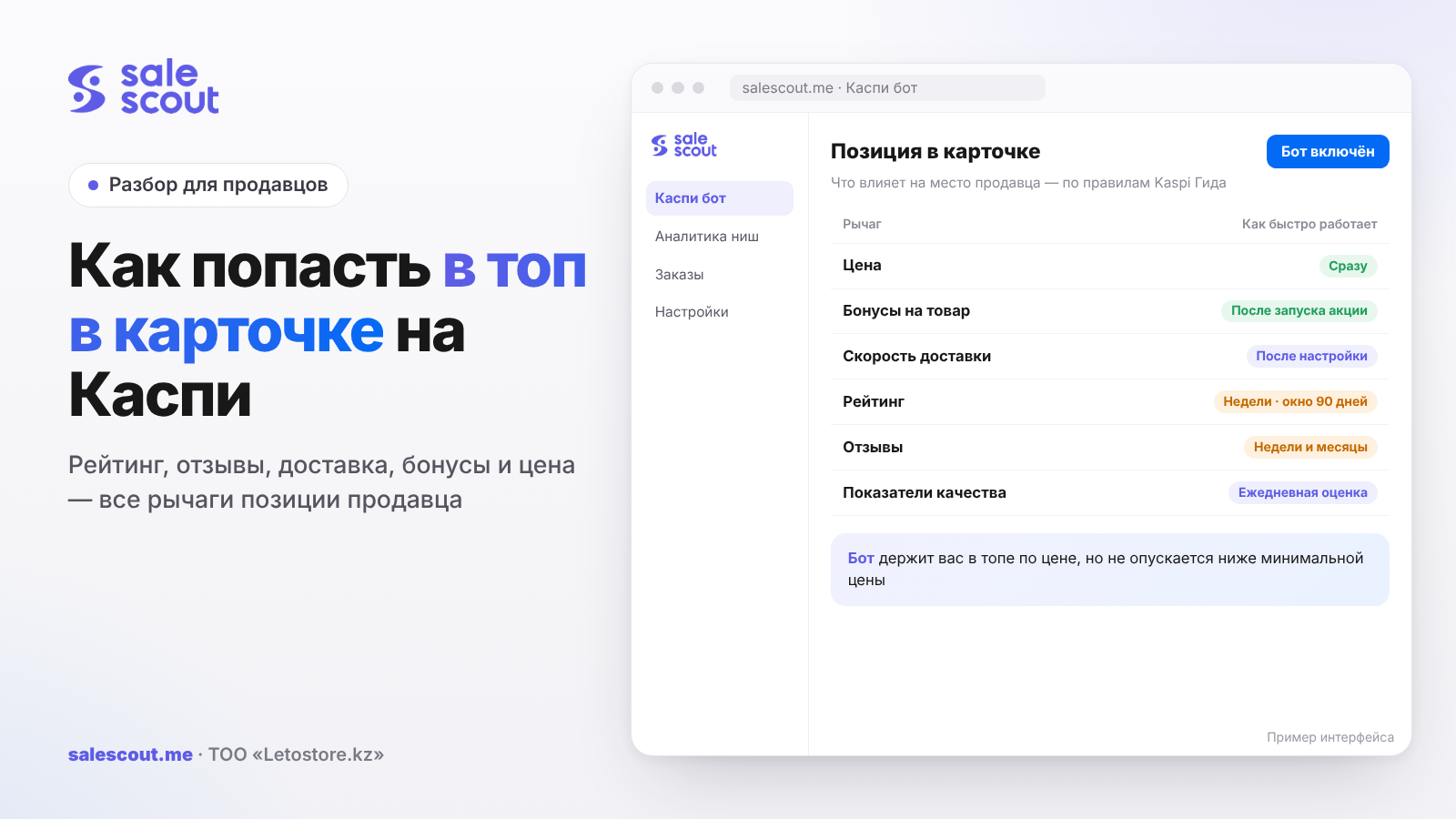
On Kaspi, many sellers can offer the same product, and they are all listed in one shared product card. Your place in that card is decided by five things, and Kaspi lists them itself: seller bonuses, price, rating, number of reviews and delivery speed. Price is the easiest to change, so that's usually where people start. But with a rating of around four stars or slipping quality metrics, even the lowest price in the card may never get you to the top.
In short
- With a rating of 3 stars or lower, you may be moved under «Ещё предложения» ("More offers") even if you're the cheapest.
- A "Very poor" («Очень плохо») status on quality metrics shuts you out of the top 3. Fix that first, then compete on price.
- The fastest delivery earns a place in the top 3 regardless of price.
- Product bonuses (Kaspi's cashback points, funded by the seller) can lift you to first place, but they require a stable price, which doesn't mix well with active dumping (aggressive price undercutting).
- We covered dumping itself and the minimum price formula in "Dumping on Kaspi". This article is about the other levers.
Map of levers
| Lever | What Kaspi says | What it costs | How fast it works |
|---|---|---|---|
| Price | With equal bonuses, the lower price ranks higher | Margin on every order | Immediately after the price is applied |
| Rating | With equal prices, the better rating ranks higher; a low rating sends you to "More offers" | Work on quality and reviews | Weeks: a 90-day window |
| Reviews | With equal price, bonuses and rating, more reviews rank higher | Service, asking for a review within the rules | Weeks and months |
| Delivery speed | The fastest delivery is always in the top 3 | A warehouse in the city, Express, logistics | Once delivery is set up |
| Product bonuses | Can lift you to first place if the offer becomes the best value | Bonus + commission on every sale | Once the promotion starts |
| Quality metrics | "Very poor" means you won't make the top 3 | Shipping and stock discipline | Assessed daily |
Where this comes from: the order of sellers in a product card, the low-rating rule, the consequences of poor metrics and bonuses, all from Kaspi Guide, Kaspi's official help center. Kaspi doesn't publish weights: nobody outside knows how many tenge of price one tenth of a rating point is "worth".
Rating: the formula and the math of recovery
How Kaspi calculates the rating
Kaspi hides nothing here ("What is a seller rating"). It takes customer ratings from the last 90 days, on a scale from 1 to 5 in steps of 0.1:
Rating = (5×A + 4×B + 3×C + 2×D + 1×E) ÷ Total number of ratings
A is how many fives you have, B the fours, and so on down to E, the ones. Until you have three ratings within 90 days, there's no rating at all. There's one useful caveat: if a customer complained that the item was damaged during Kaspi Delivery (Kaspi's own shipping service), their review isn't counted. Dropping below 4 stars is dangerous, though: in that case Kaspi reserves the right to take measures up to ending the partnership.
How many fives you need to raise your rating
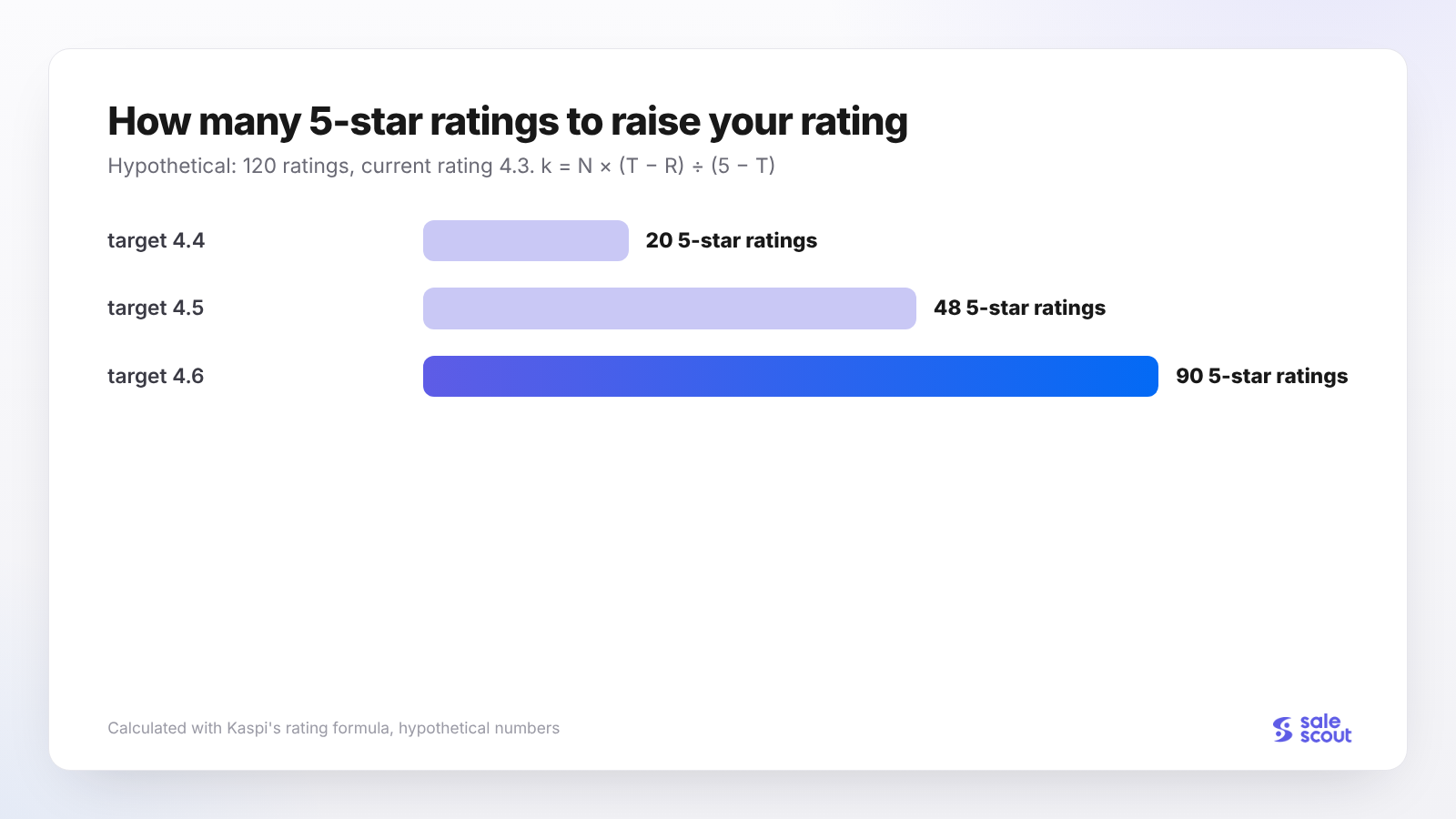
The formula is easy to turn around. You have N ratings with an average of R and want to reach T. The number of fives you need:
k = N × (T − R) ÷ (5 − T)
Let's plug in hypothetical numbers: 120 ratings, currently 4.3, target 4.6. That gives 120 × 0.3 ÷ 0.4 = 90 fives, with not a single four in between. In real life you'll need more. Someone will give a four anyway, and meanwhile old ratings drop out of the 90-day window, which can be an old one (good for you) or an old five.
The math works against you too. A store with 50 ratings and a 4.6 rating gets one 1-star rating, and the average sinks to roughly 4.5. The fewer ratings you have, the more each one hurts.
What actually moves the rating
People don't give one star because of the price. Usually it's because what arrived didn't match the photo, or something was missing from the box: a charger, the mounting hardware, the second case in a set. So the first thing to do is compare the product card with what you actually put in the parcel. If the card says "set of two" and your supplier's packaging changed so there's only one now, your ratings will start sliding within a week.
Packaging is trickier. Damage during Kaspi Delivery doesn't count toward your rating, but only if the customer reported it. Someone who received a crushed box isn't obliged to figure out whose fault it was, and often just gives the seller a two. An extra layer of wrap on a fragile item costs pennies next to one rating like that.
Chat isn't formally part of the quality metrics (Kaspi Guide). In practice, a customer who got a reply within ten minutes and was told where in the box the adapter is hidden rarely goes on to give one star.
Number of reviews
Reviews are the fourth factor. They come into play when price, bonuses and rating are the same: the seller with more reviews ranks higher. For a young store, the conclusion is unpleasant. Match the price of a competitor who's been selling for three years, and they'll almost certainly be above you. Waiting until your review counts are equal takes a long time. It's more realistic to beat them on price or speed and let the reviews build up in parallel.
One more thing: while you have few ratings, one charger forgotten in a box moves your average far more than it would a year from now.
There's one line you shouldn't cross: rewarding customers for a good review or for changing a bad one, and placing orders with yourself to boost your rating. The rules prohibit this explicitly (clauses 6.1–6.2), and risking your store for a couple of tenths of a point makes no sense.
Quality metrics: the entry ticket to the top 3
Every day Kaspi looks at four numbers: rating, cancellations due to your fault, delays in handing orders over to Kaspi Delivery, and returns for quality reasons. Thresholds from the official pages:
| Metric | Minimum requirement | For "Excellent seller" («Отличный продавец») |
|---|---|---|
| Rating | 4 stars or higher | above 4.6 |
| Cancellations due to your fault | below 3% | below 1% |
| Delays handing over to Kaspi Delivery | under 10% | under 5% |
| Returns for quality reasons | below 2% | below 1% |
| Orders delivered in 30 days | — | 25 or more |
Kaspi publishes the minimum requirements on the page about reasons for disconnection, and the badge thresholds where it describes the "Excellent seller" status.
If you drop to "Poor" («Плохо»), you have 14 days to recover. "Very poor" is more serious: your rating can be cut to 3 stars, and you won't make the top 3 (Kaspi Guide). Dumping in that state means giving away margin for a spot you won't be shown in anyway.
The most common thing that breaks metrics is cancellations because the item isn't actually in stock. A typical scenario: on Friday evening you cut the price on a fast-moving item, by Saturday lunchtime you've sold more than you have on the shelf, and on Monday you're cancelling three orders. Incidentally, the rules prohibit listing items you don't have, except for pre-orders (clause 1.10). The higher you sit in the card, the faster your stock melts, so on dumping items you need to reconcile it more often than on the rest.
Delivery speed: a separate entrance to the top 3
This lever gets mentioned less often than it should. Kaspi writes that the seller with the fastest delivery is always shown in the top 3, and if they lose on price and bonuses, they get third place (Kaspi Guide).
That means you can take third place without touching your price at all. Here's how sellers do it:
- keep a warehouse or pickup point in the city where the customer lives;
- connect in-city Express, which costs more: an order from 10,000 ₸ weighing up to 5 kg costs 1,699 ₸ excluding VAT instead of 1,099 ₸ (Kaspi Delivery rates);
- hand orders in at the drop-off point earlier.
Kaspi doesn't disclose exactly how speed is compared between sellers or across which cities. The only reliable way is to look at the card on a phone from the different cities where you sell, or ask friends there to take a screenshot.
Work out Express before you connect it, not after. The difference from regular delivery is 600 ₸ excluding VAT, about 696 ₸ including VAT. If you'd have to cut your price by 500 ₸ to take first place on price, Express loses. If it's 1,000 ₸, it wins. These numbers are hypothetical; plug in your own.
Product bonuses: a strong but finicky lever
How it works
Bonuses are launched from the «Маркетинг» ("Marketing") service in Kaspi Pay. Launching is free; you pay on every sale: the bonus to the customer plus the usual commission (Kaspi Guide). The promotion lifts you to first place if, with the bonus, your offer becomes the best value in the card. If it doesn't, those with lower prices stay on top (Kaspi Guide).
The condition people forget
You can't launch the promotion on just any product. The product must have been on sale for 14 days, its price must not have moved more than 3% in that time, and the price itself must be the minimum or no more than 3% or 3,000 ₸ above the minimum (promotion conditions).
This is where sellers trip up. A product on which you spent two weeks trading blows with a competitor in 1 ₸ steps, sliding down 5% along the way, won't qualify for the promotion. So it's better to split your assortment in advance: these items we compete on price, and these we keep steady and win with bonuses.
Bonus or price cut: which is cheaper
It's easiest to show with numbers. A hypothetical product at 15,000 ₸, commission 12.5%, simplified tax regime 3%; we compare a 5% bonus, which is 750 ₸, with a price cut of exactly the same amount.
| Bonus of 750 ₸ | Price cut of 750 ₸ | |
|---|---|---|
| Price | 15,000 ₸ | 14,250 ₸ |
| Commission 12.5% | 1,875 ₸ | 1,781 ₸ |
| Tax 3% | 450 ₸ | 428 ₸ |
| Bonus to the customer | 750 ₸ | — |
| Left after commission, tax and bonus | 11,925 ₸ | 12,041 ₸ |
| Difference | about 116 ₸ in favor of the price cut |
Cutting the price works out 116 ₸ cheaper, because commission and tax are taken from a smaller amount. There's an assumption here: we calculated tax on the full price, and how exactly bonuses enter your tax base is a question for your accountant. So why use bonuses at all? When the price has already hit your minimum and can't go lower. Or when you don't want to show the whole card a new, lower price that everyone else will immediately follow.
Ads: a detour to the customer
Ads in Kaspi Marketing (in-platform advertising) don't affect the order of sellers in a regular product card. But they have one interesting feature: if a customer opened the card from an ad, they see only your store there, even if ten other people sell the product (Kaspi Guide). You're allowed to advertise if your price is no more than 3% and no more than 3,000 ₸ above the minimum price in the Kaspi store (Kaspi Guide).
So you can win some customers without climbing to first place at all. How to choose a bid so clicks pay off is covered in "Kaspi Marketing: Cost-per-Click Bids".
A 30-day plan
- Week 1. Open your quality metrics. If even one is below the minimum requirement, everything else waits.
- Week 1. Calculate minimum prices for at least your twenty best-selling products.
- Week 2. Sort your assortment into three piles: where you compete on price, where on bonuses, where you can win on speed.
- Weeks 2–3. Reread your recent low ratings and fix the causes: what's in the box, packaging, the card text.
- Weeks 3–4. Where you can't take first place on price, estimate ads and a bid.
- End of the month. For each group, compare how long you were at the top and how much you earned net.
Common mistakes
Dumping with a rating around 4. Your price is 1 ₸ lower, but you're still not on top because the rating outweighs it. The margin is gone and the spot never came.
"Out of stock" cancellations. A couple of those a week, and your metrics creep toward "Very poor", which means no top 3 on all your products, not just one.
Bonuses on a product with a jumpy price. Two weeks of battling a competitor, the price drifts by 4%, and then it turns out you can't launch the promotion: the 3%-in-14-days condition.
Believing a bonus and a discount cost the same. Commission and tax are calculated on the full price, so the bonus is more expensive, by 116 ₸ per order in our example.
Forgetting about delivery. You can get third place for speed without touching your price. But you at least need to know who in your city delivers faster than you, and that's five minutes with a phone.
Buying reviews. No nuance here: Kaspi's rules prohibit it outright, and what's at stake is no longer your position in one card but your whole store.
Checking your position only from your own phone. In Almaty you're second, but a customer in Shymkent with a different app version may see a completely different order.
Checklist
Start with your quality metrics: as long as even one is below the minimum requirement, working on price is almost pointless. Then look at your rating and use the formula above to work out how many fives you need to hit your target. That tells you whether this is a month of work or a quarter.
Next, a short list that's convenient to go through once a week:
- Stock in your seller cabinet (Kaspi's seller dashboard) matches the warehouse; no cancellations due to stock.
- Minimum prices are calculated for products where you manage price.
- For products at their minimum price, bonuses have been checked against the 3% condition.
- You know who in the card delivers fastest and whether you can beat them.
- Ads are calculated for products with no chance of first place.
- Your position has been checked in at least two cities.
- Time at the top and net profit have been compared.
How to automate it
Automation won't build your rating, reviews or delivery for you. But tracking a price that competitors change ten times a day by hand is exhausting. SaleScout's Kaspi bot checks prices every 20 seconds and keeps you at the top of the card, as long as that doesn't require going below your minimum price. If a competitor raises their price or leaves, the bot raises yours too. You can try it free for 7 days, no card required.
FAQ
What determines a seller's place in a Kaspi product card?
There are five factors, and Kaspi Guide lists them: seller bonuses, price, rating, number of reviews and delivery speed. Whoever delivers fastest is always in the top 3. With a rating of 3 stars or lower, you can end up under "More offers" even with the lowest price.
How do I raise my seller rating on Kaspi?
First estimate the amount of work: you need roughly N × (T − R) ÷ (5 − T) fives in a row, where the rating is the 90-day average. For example, about 90 fives will lift 120 ratings averaging 4.3 to 4.6. After that it all comes down to what's in the box, packaging and quick replies in chat; the rules prohibit buying reviews.
Why do I have the lowest price but I'm not first in the card?
Most likely the competitor has product bonuses, your rating is 3 stars or lower, or your quality metrics have dropped. Another possibility is that the competitor took a top-3 spot thanks to delivery speed. Kaspi also warns that the app updates gradually, so the order may differ between customers.
Do product bonuses help you reach the top on Kaspi?
They do if, with the bonus, your offer becomes the best value: then, according to Kaspi Guide, it moves up to first place. The launch condition is that the price hasn't changed by more than 3% in 14 days. And keep in mind that a bonus costs more than the same price cut, because commission is taken from the full price.
Can I get into the top 3 without the lowest price?
Yes, if you deliver faster than everyone else: under Kaspi's rules, that seller is shown in the top 3 even when losing on price and bonuses. Express does cost money, though. Compare its surcharge with how much you'd have to cut your price to take first place.
What happens to my position if my quality metrics are poor?
While the status is "Poor", your position doesn't suffer: you have 14 days to fix things. At "Very poor", Kaspi can cut your rating to 3 stars and remove you from the top 3, and ending the partnership looms after that. Cutting your price at that point is useless.
Do ads in Kaspi Marketing affect my place in the card?
No, ads don't touch the regular order of sellers. Their trick is different: someone who arrives from an ad sees only your store in the card. You'll be allowed to run them if your price is no more than 3% and no more than 3,000 ₸ above the minimum.
Sources
All links checked Oct 15, 2026. The sources are in Russian; original titles are given with English translations.
- Kaspi Guide for partners. «Как располагаются продавцы в карточке товара?» ("How are sellers ordered in a product card?") — https://guide.kaspi.kz/partner/ru/shop/goods/general/q3190 (updated Jun 15, 2026)
- Kaspi Guide for customers. «Почему в карточке самая низкая цена, но я не могу найти её у продавцов?» ("Why does the card show the lowest price, but I can't find it among the sellers?") — https://guide.kaspi.kz/client/ru/shop/choice/q18442
- Kaspi Guide for partners. «Что такое рейтинг продавца?» ("What is a seller rating?") — https://guide.kaspi.kz/partner/ru/shop/quality_index/rating/q2248
- Kaspi Guide for partners. «Что такое показатели качества?» ("What are quality metrics?") — https://guide.kaspi.kz/partner/ru/shop/quality_index/general/q4034
- Kaspi Guide for partners. «Почему меня отключили от Магазина на Kaspi.kz?» ("Why was I disconnected from the Kaspi.kz store?") — https://guide.kaspi.kz/partner/ru/shop/conditions/q2920
- Kaspi Guide for partners. «Как получить статус „Отличный продавец“?» ("How do I get the 'Excellent seller' status?") — https://guide.kaspi.kz/partner/ru/shop/quality_index/general/q4035 (updated Feb 2, 2026)
- Kaspi Guide for partners. «У меня плохие показатели качества. Меня отключат?» ("My quality metrics are poor. Will I be disconnected?") — https://guide.kaspi.kz/partner/ru/shop/quality_index/general/q4620 (updated Feb 25, 2026)
- Kaspi Guide for partners. «Какие правила работы с Магазином на Kaspi.kz?» ("What are the rules for working with the Kaspi.kz store?") — https://guide.kaspi.kz/partner/ru/shop/conditions/q1342 (updated Sep 30, 2026)
- Kaspi Guide for partners. Product bonuses: cost — https://guide.kaspi.kz/partner/ru/marketing/bonus_purchase/q3809; effect on position — https://guide.kaspi.kz/partner/ru/marketing/bonus_purchase/q4752; conditions — https://guide.kaspi.kz/partner/ru/marketing/bonus_purchase/q3814 (updated Jul 27, 2026)
- Kaspi Guide for partners. Product ads: the card opened from an ad — https://guide.kaspi.kz/partner/ru/marketing/advert_goods/q2067; launch conditions — https://guide.kaspi.kz/partner/ru/marketing/advert_goods/q2088
- Kaspi Guide for partners. «Сколько стоит Kaspi Доставка?» ("How much does Kaspi Delivery cost?") — https://guide.kaspi.kz/partner/ru/shop/delivery/shipping/q2288
Bota, SaleScout analyst
SaleScout is our company's product. Kaspi and Kaspi.kz are trademarks of Kaspi.kz JSC; SaleScout is not affiliated with Kaspi.